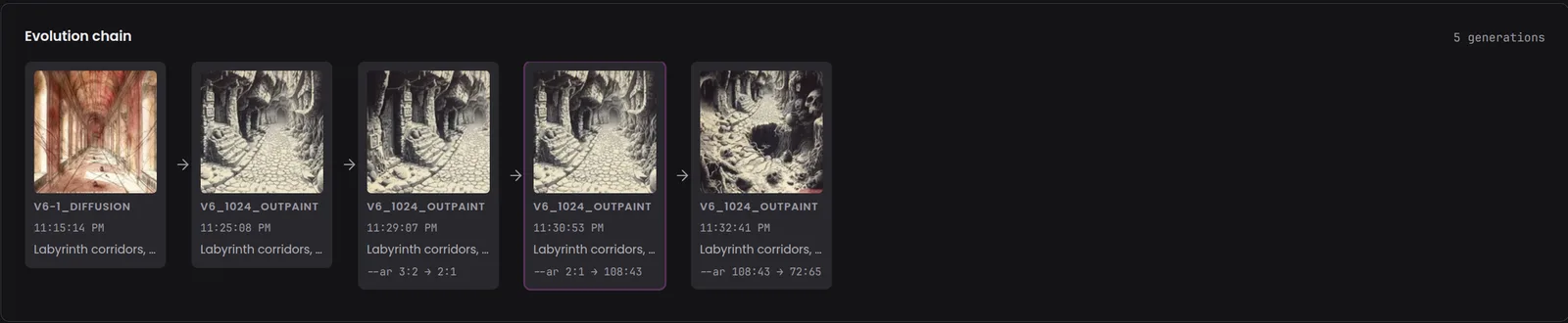
One card per generation
Each node shows the generation’s thumbnail, its Midjourney job type (for example V6_1024_OUTPAINT), the time it was enqueued, and the start of its prompt. Hover the prompt to read it in full.
Loading...
Every Midjourney image has ancestors. The evolution chain on an asset page lays out the generations that led to it and the ones that came after, in order, with the parameter changes between each step.
Open any Midjourney asset and scroll to the Evolution chain card, just under the image. Earlier generations sit on the left and later ones on the right.
Each node shows the generation’s thumbnail, its Midjourney job type (for example V6_1024_OUTPAINT), the time it was enqueued, and the start of its prompt. Hover the prompt to read it in full.
Under each node, the parameters that differ from the generation before it, such as --ar 3:2 → 2:1. A flag that was added shows as + --flag, one that was removed as − --flag. The first three changes are listed, then a “+N more” count.
The asset you are viewing is outlined in the chain, so you can see how far along the journey it sits: an early draft, a mid-way variation, or the final.
Select any other generation’s thumbnail to open its asset page. Generations whose image is not in your library appear without a thumbnail and cannot be opened.
Midjourney records a job ID for every generation and the ID of the job it came from. Numonic keeps both when you import.
The chain begins at the job behind the asset you are viewing.
Numonic follows parent IDs to the ancestors and child IDs to the descendants, up to 10 generations each way on the asset page.
Nodes are ordered from earliest to latest, and each one is compared with its parent to find the parameter changes.
The chain only connects what Midjourney recorded. If an asset has no parent or child job, the card says so instead of guessing. ComfyUI assets show their workflow graph in this spot; see Lineage Tracking for how ComfyUI relationships are tracked.
The asset page reads the same data you can fetch yourself. Both routes need an API key with the read scope.
GET /api/v1/assets/{assetH}/evolution-chain?max_depth=10Returns nodes (job ID, parent ID, job type, prompt, full command, timestamp, asset ID and depth) and edges linking parent to child. max_depth accepts 1 to 50.
GetMidjourneyEvolutionChain(asset_id, max_depth)The same chain for agents. See the MCP Tool Reference.
Import your Midjourney history and every variation, upscale and outpaint is linked back to the job that started it.